如何使用github搭建个人博客
1. 先在本地搭建博客
准备:
- 安装jekyll
- 新建或者克隆一个项目
- 使用jekyll部署
1.1 安装jekyll
为什么要使用jekyll,jekyll的中文网站已经解释的很清楚了:
简单 不再需要数据库,不需要开发评论功能,不需要不断的更新版本——只用关心你的博客内容。 使用 Jekyll
静态 Markdown(或 Textile)、Liquid 和 HTML & CSS 构建可发布的静态网站。 Jekyll 模版
博客支持 支持自定义地址、博客分类、页面、文章以及自定义的布局设计。 迁移你的博客
建议在linux系统下使用jekyll, 我在windows下折腾了半天都没能解决编码问题,官方也告诫最好不要在windows下使用,如果手里只有windows计算机,可以使用win10自带的ubuntu子系统,亲测有效.
- 先安装ruby
apt-get install ruby-full然后到ruby中国去替换ruby源,不然安装包会很慢.gem sources --add https://gems.ruby-china.com/ --remove https://rubygems.org/ bundle config mirror.https://rubygems.org https://gems.ruby-china.com - 使用
gem安装jekyllgem install jekyll
1.2 新建或者克隆一个项目
1.2.1 基本步骤
先从简单的开始,克隆一个项目:
$git clone https://github.com/poole/poole.git
$cd pool
$jekyll serve
Configuration file: /mnt/d/code/learbhub/blog/poole/_config.yml
       Deprecation: The 'gems' configuration option has been renamed to 'plugins'. Please update your config file accordingly.
            Source: /mnt/d/code/learbhub/blog/poole
       Destination: /mnt/d/code/learbhub/blog/poole/_site
 Incremental build: disabled. Enable with --incremental
      Generating...
                    done in 1.388 seconds.
                    Auto-regeneration may not work on some Windows versions.
                    Please see: https://github.com/Microsoft/BashOnWindows/issues/216
                    If it does not work, please upgrade Bash on Windows or run Jekyll with --no-watch.
 Auto-regeneration: enabled for '/mnt/d/code/learbhub/blog/poole'
    Server address: http://127.0.0.1:4000/
  Server running... press ctrl-c to stop.
这时在本地(http://127.0.0.1:4000/)就可以打开访问了
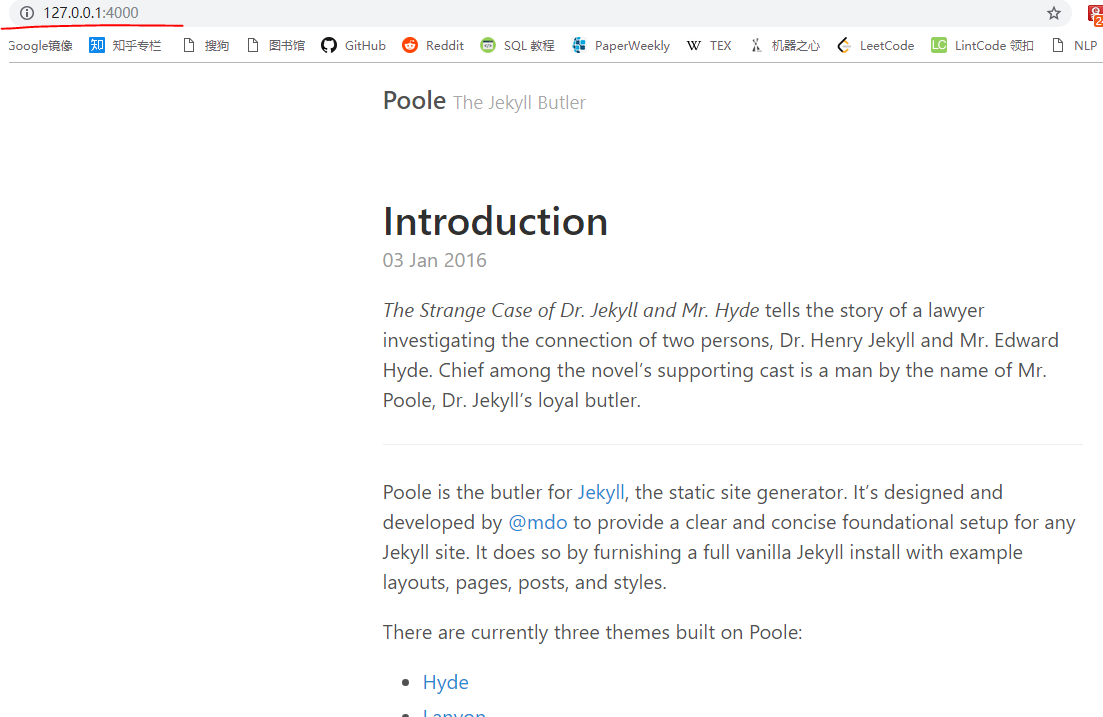
远端访问可以使用命令:
jekyll s --host='0.0.0.0'
1.2.2 文件结构解释
主要模块及其作用:
_config.yml保存配置数据。很多配置选项都可以直接在命令行中进行设置,但是如果你把那些配置写在这儿,你就不用非要去记住那些命令了。_draftsdrafts(草稿)是未发布的文章。这些文件的格式中都没有 title.MARKUP 数据。_includes你可以加载这些包含部分到你的布局或者文章中以方便重用。可以用这个标签 来把文件 _includes/file.ext 包含进来。_layoutslayouts(布局)是包裹在文章外部的模板。布局可以在 YAML 头信息中根据不同文章进行选择。_posts这里放的就是你的文章了。文件格式很重要,必须要符合: YEAR-MONTH-DAY-title.MARKUP。_data格式化好的网站数据应放在这里。jekyll 的引擎会自动加载在该目录下所有的 yaml 文件(后缀是 .yml, .yaml, .json 或者 .csv )。这些文件可以经由 `site.data` 访问。如果有一个 members.yml 文件在该目录下,你就可以通过 site.data.members 获取该文件的内容。_site一旦 Jekyll 完成转换,就会将生成的页面放在这里(默认)。最好将这个目录放进你的 .gitignore 文件中。index.html and other HTML, Markdown, Textile files如果这些文件中包含 YAML 头信息 部分,Jekyll 就会自动将它们进行转换。当然,其他的如 .html, .markdown, .md, 或者 .textile 等在你的站点根目录下或者不是以上提到的目录中的文件也会被转换。其他其他一些未被提及的目录和文件如 css 还有 images 文件夹, favicon.ico 等文件都将被完全拷贝到生成的 site 中
pool里面的目录结构是这样的:
poole/
├── 404.html
├── LICENSE.md
├── README.md
├── _config.yml
├── _includes # 方便文件重用
│   └── head.html
├── _layouts # 外部的模板,控制页面样式
│   ├── default.html
│   ├── page.html
│   └── post.html
├── _posts # 存放文章的地方,一般都是markdown文件
│   ├── 2016-01-01-whats-jekyll.md
│   ├── 2016-01-02-example-content.md
│   └── 2016-01-03-introduction.md
├── _sass # css扩展,控制样式
│   ├── _base.scss
│   ├── _code.scss
│   ├── _layout.scss
│   ├── _masthead.scss
│   ├── _message.scss
│   ├── _pagination.scss
│   ├── _posts.scss
│   ├── _syntax.scss
│   ├── _type.scss
│   └── _variables.scss
├── _site # jekyll转化后的文件
│   ├── 2016
│   │   └── 01
│   │       ├── 01
│   │       │   └── whats-jekyll
│   │       │       └── index.html
│   │       ├── 02
│   │       │   └── example-content
│   │       │       └── index.html
│   │       └── 03
│   │           └── introduction
│   │               └── index.html
│   ├── 404.html
│   ├── LICENSE.md
│   ├── README.md
│   ├── about
│   │   └── index.html
│   ├── atom.xml
│   ├── index.html
│   ├── page2
│   │   └── index.html
│   ├── page3
│   │   └── index.html
│   ├── public
│   │   ├── apple-touch-icon-precomposed.png
│   │   └── favicon.ico
│   └── styles.css
├── about.md # 简介
├── atom.xml
├── index.html # 首页
├── public # 公共文件
│   ├── apple-touch-icon-precomposed.png
│   └── favicon.ico
└── styles.scss

18 directories, 41 files
1.2.3 频繁使用的地方
_posts存放markdwon文件的地方_config.yml配置
_posts
所有的文章直接放在_posts文件夹下面,格式就是我们之前提到的markdown文件,默认的格式是.md和.markdown文件。每篇文章的开始处需要使用yml格式来写明这篇文章的简单介绍,格式如下:
---
    author: kresnikwang
    comments: true # 是否能被评论
    date: 2015-04-28 17:42:32+00:00
    layout: post
    title: PHP, Angular JS Development|My Export Quote|农产品出口工具开发
    categories: # 分类
    - Works
    - Tech
    tags: # 标签
    - bootstrap
    - javascript
    - php
    - AngularJS
    ---
_config.yml
详见(http://jekyllcn.com/docs/configuration/)
# Permalinks
permalink:           pretty

# Setup
title:               Poole
tagline:             The Jekyll Butler
url:                 http://getpoole.com
paginate:            1
baseurl:             ""

# Assets
#
# We specify the directory for Jekyll so we can use @imports.
sass:
  sass_dir:          _sass
  style:            :compressed

# About/contact
author:
  name:              Mark Otto
  url:               https://twitter.com/mdo
  email:             markdotto@gmail.com

# Custom vars
version:             2.0.0
github:
  repo:              https://github.com/poole/poole

# Gems
gems:
  - jekyll-paginate
  - jekyll-gist